


I have a very strange issue which is causing problems playing videos over a wireless‑n network. Playing the videos causes the network to drop out after a short period. Sometimes this only lasts for 2–3 seconds, which just causes a video stutter. Other times the drop out is more permanent and takes nearly a minute to recover, es sei denn, die drahtlose Funk ausgeschaltet und wieder auf, worauf recon-ang-tion erfolgt.
Running a continuous ping during this results in timeouts when the connection drops. The connection is more likely to recover within 2–3 seconds if the video is paused as soon as the problem occurs. Now the strange part. If I simultaneously copy a large file over the wireless at the same time as playing the video then playback is fine and no drop outs occur! This is affecting a wireless connection between a Draytek Vigor2820Vn and 2 different laptops with Intel 5×00 wireless cards. Both laptops are running Windows 7 x64. I have also tried with an Intel 6300 Wireless card.
Die ich bisher getestet und etabliert die folgenden Fakten (Anmerkung: all speeds are given in bits not bytes)…
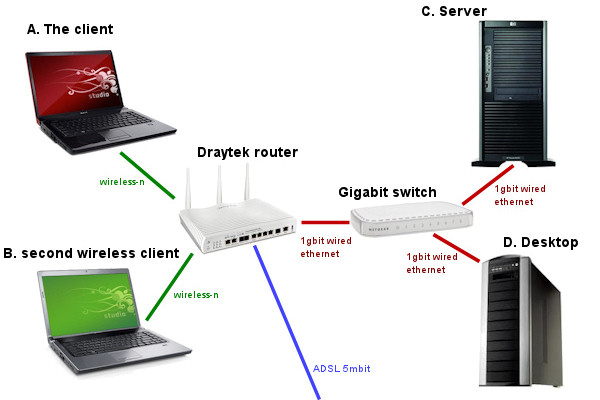
1. The direction of the file transfer doesn’t matter, es kann auf die Client-oder von der Client-sein (z.B. von A bis C oder von C nach A). Es kann auch ini-ti-ATED von der Client-sein, or by the other end of the transfer (d.h. ini-ti-ATED von C). 2. Die Dateiübertragung kann auf einem anderen Computer als der Quelle des Videos sein, oder dieselbe, Es hat immer die gleiche "schützende" Wirkung. (d.h. Datei Streaming-von C nach A, Datei-Kopie ist von B nach A)
3. Spiele-ten nur 1 video with a bitrate of 2Mbps doesn’t seem to exhibit the issue? 2 Videos with a total of 4Mbps do suffer. Videos up to and including 13Mbps all exhibit the same issue. Higher rates haven’t been tested but I expect them to have the same problem.
4. There are no other nearby wireless networks effecting network performance, und Dateiübertragungen arbeiten zuverlässig bei ca. 70Mbps, so dass die Verbindung nicht Bandbreite begrenzt.
5. Zunehmende die Puffer-in WMP zu 30 seconds has no benefit. Furthermore the judders in video playback still occur at the same time as the ping timeouts so the buffer doesn’t even seem to be working?
6. Der Router-Firmware ist up-to-date, and it has had the wireless board replaced without resolving the problem. The issue also occurred with older firmware.
7. The drivers for the wireless cards are up to date. The issue also occurred the same with older drivers.
8. Wenn die Verbindung unterbricht sie schneidet alle Wireless-Clients, auch diejenigen, die nicht in der Streaming beteiligt, so dass die Ausgabe * scheint * wahrscheinlich am Router Ende der Verbindung werden, nicht das Client-Ende? (d.h. wenn-ten Strom von C zu A, B ist auch aus tem-por-ar-ily geschnitten)9. A web-download at ~300k/sec (2.4Mbps) doesn’t offer the same protective effect as the ~70Mbps file transfer.
10. Das Problem tritt auf, auch wenn der Client- (ein Laptop) is on battery or plugged in. So it seems unlikely to be power-management related?
11. Deaktiviert IPv6 ohne bene-fit
12. Versucht Streaming-Video von sowohl Windows- 2003 (server C) und Windows 7 (Desktop-D) Hosts ohne Änderung, so Problem ist nicht auf SMB bezogenen 2.0
13. Versucht die Wiedergabe mit einer Vielzahl von Spielern wie Media Center 7, Windows Media Player 12 x64, Windows Media Player 12 x86, MPC-HC x64 und VLC — all exhibit the problem
14. Upgrad-ten zu einem Intel 6300 Wireless-Karte macht keinen unterschied-fer-renz
15. Die Entfernung von Router macht keinen Unterschied
16. Das Problem tritt schneller je intensiver der Verkehr
17. The problem happens significantly less with a shorter wireless key
Meine beste Theorie ist, dass der Router über eine obskure Angelegenheit, wo es reduziert Wireless Geschwindigkeit, wenn es erkennt, dass die Verbindung unter geringer Nutzung, but this low speed state isn’t sufficient for the peaks of required bandwidth in variable bit rate video streams and goes into some kind of error state which is only relieved when the video playback is halted. Copying a file is sufficiently intensive to prevent this state being entered, but a web-download isn’t.
Weiter möchte ich einen der Laptops mit Windows XP als zu versuchen die OS statt Win7, altho I don’t expect this to help. Then I’d like to try a different router / wireless‑n WAP which if my theory is correct will cure the problem. Sadly I don’t have a source of a wireless‑n WAP oder Router im Moment.
If anyone has any other ideas for things to try/test, or has a similar problem please get in touch!
Aktualisierung 1 (5/Jan-2011)
Ich bin nicht der einzige, bei denen dieses. Googling shows up a range of other people who have had similar issues but as yet no solutions. List of links below…
Aktualisierung 2 (23-März 2011)
Ich habe ver-schiedenen Teilen der Beitrag aktualisiert, und hat eine Reihe von Links unten.
I’m at a point now where I need to test my laptop with a different Wireless‑N network. If it works then I think I can conclude there is a problem with my router. If it doesn’t work then there is something wrong with either Intel wireless cards, oder mit Dell Stu-dio-Laptops!
https://www.sevenforums.com/network-sharing/110061-windows-7-wireless-connections-drop-out.html — Sound similar, but not quite the same. My adaptor still sees wireless networks as far as I can tell
https://forums.whirlpool.net.au/archive/1300843 - Manche Leute sagen, seine Intel-ten Karten, but others saying changing card didn’t help. Nothing conclusive.
https://forums.lenovo.com/t5/W‑Series-ThinkPad-Laptops/INTEL-5100–5300-Network-Dropouts-Disconnects/m‑p/97708 — Another speculating about Intel drivers, aber immer noch mit einem ungelösten Problem, so nicht sehr hilfreich
https://forums.smallnetbuilder.com/showthread.php?t=1997&page=3 — Similar sounding problem with a Belkin router. Problem resolved by replacing router.
Aktualisierung 3 (30-Mai-2011)
Ich habe den Laptop-con-ang-ten getestet 2 more wireless‑n networks. It works without any issue. In conclusion there is either a fault with the draytek or there is an incompatibility. Having already sent the draytek back once before I am rather disappointed that draytek failed to resolve the issue.
Wenn Sie denken,-ing von get-ting ein Draytek sind, consider an alternative. I can recommend the Netgear DGND3700


“Hi James I realise it has been a long while, but I just checked this on windows 11 (build 23H2)…”